Let’s be honest: most salespeople hate their CRM. Dozens of fields, reports for the sake of reports, and in the end leads still live in a notebook, a messenger app and someone’s head. noCRM is a French sales tool that took a radical approach: it stripped out everything that doesn’t help you sell and kept one question for every lead — “What’s the next step?”
What is noCRM and who’s behind it
noCRM is a sales CRM that deliberately refuses to be a “traditional” CRM. There are no modules for marketing, customer support or inventory. Instead, you get leads, a sales pipeline and reminders that make sure no prospect slips through the cracks.
It’s built by Positive Group, a French company whose portfolio also includes Surfer, Signitic and Iconosquare. The product is developed and hosted in the EU and is fully GDPR-compliant, with encrypted data and daily backups — a strong argument for any business that handles European customer data.
The core idea: every lead has a next action
What is a CRM in the classic sense? A contact database that salespeople are constantly forced to update. noCRM works differently: at the center is not a contact but a lead — a potential deal. And every lead must have a next step: a call, a meeting or an email with a specific date. If a lead has no next step, the system flags it immediately.
Key features of noCRM
Despite its minimalism, noCRM has everything a real sales team needs. Here are the highlights, with a plan label where a feature isn’t available on every tier.
Capture leads from anywhere
Import from Excel, CSV, email, WhatsApp, LinkedIn or even a business card scan. Duplicates are detected automatically by email or phone number.
Visual pipeline
Drag and drop leads between stages. Stages, custom fields, categories and tags adapt to your process.
Unlimited pipelines — Expert+Smart follow-ups
Schedule a call, meeting or email and get a reminder synced with your calendar. You always know what’s next.
Create a lead from a chat in one click via the browser extension, use message templates and sync conversations to the lead.
Dream planVoIP calling
Integrations with Aircall, CloudTalk, JustCall, Ringover and more: one-click calls, call recordings, scripts and transcripts.
Dream planQuotes & invoices
Branded quotes, invoices and deposits in seconds, with their status tracked right on your sales dashboard.
Expert+Mobile app
iOS and Android, works even offline. Perfect for reps who sell in the field.
Integrations & API
Zapier, Slack, Google Workspace, Calendly, Mailchimp, PandaDoc, QuickBooks, an open API and webhooks.
API — Expert+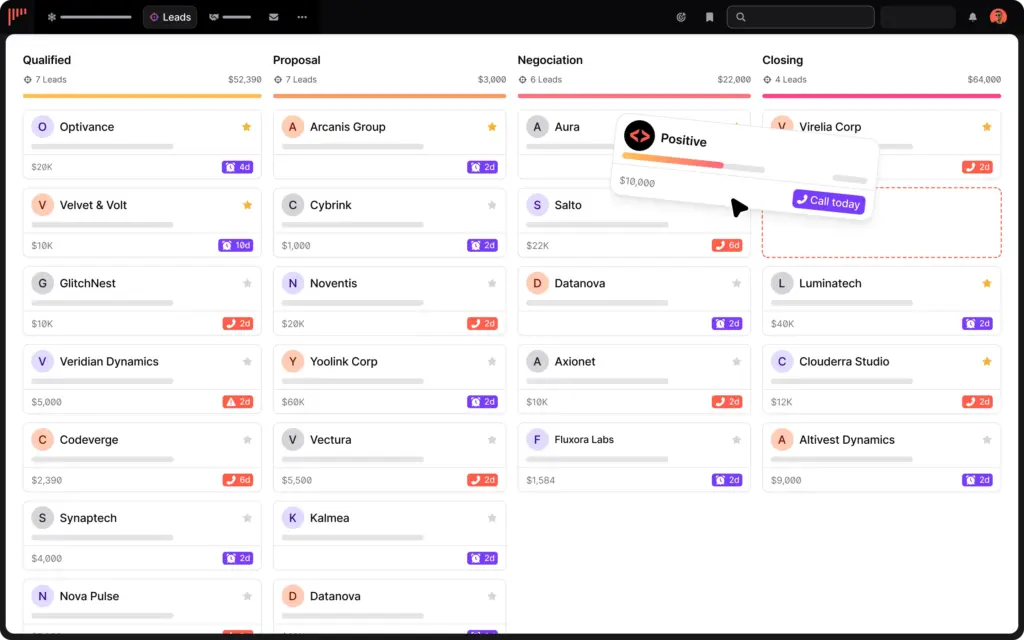
What users say: ratings across review platforms
There are enough reviews of noCRM to draw real conclusions: over four thousand ratings across five independent platforms. Most of them come from French platform Appvizer, which makes sense for a French product.
- Appvizer ★ 4.62,235
- G2 ★ 4.6592
- Google ★ 4.6575
- Capterra ★ 4.6483
- Trustpilot ★ 4.9276
Users most often praise its simplicity: even people with no sales background can use it, and setup takes minutes rather than weeks. The most common complaint is per-user pricing — the bigger the team, the more noticeable the bill.
How much does noCRM cost?
noCRM has three plans, all billed per user. There’s no free plan, but you get a 15-day free trial with no credit card and full access to every feature. Add your payment details and the trial extends to 30 days. Annual billing saves up to 40%.
Starter
- 500 leads in one pipeline
- Quick lead capture
- Notes & reminders
- Mobile app
- New customers only
Expert
- Everything in Starter
- Unlimited leads & pipelines
- Unlimited customization
- Quotes & invoices
- Advanced performance tracking
- 3,000+ integrations & API
Dream
- Everything in Expert
- WhatsApp & VoIP integrations
- Two-way email sync
- Team, role & permission management
- Internal automations
- Priority support
* Indicative pricing as of October 2026. Check current prices on the official noCRM website.
What will it cost your team? Here’s the monthly budget for teams of different sizes:
| Users | Starter | Expert | Dream |
|---|---|---|---|
| 1 (freelancer) | €11 | €22 | €33 |
| 3 reps | €33 | €66 | €99 |
| 5 reps | €55 | €110 | €165 |
| 10 reps | €110 | €220 | €330 |
noCRM vs HubSpot: price comparison
HubSpot is the best-known CRM for business, so the comparison is inevitable. The gap is especially visible on mid-tier and top-tier plans.
| Criteria | noCRM | HubSpot |
|---|---|---|
| Approach | Sales only, focused on the next action | All-in-one platform: sales, marketing, service |
| Free plan | No, 15–30 day trial | Yes, up to 2 users |
| Time to get started | Minutes | Requires setup |
| Mid-tier price | $26 | $100 |
| Marketing automation | Not included | Yes (separate hub) |
| Best for | Freelancers, small businesses, telesales | Mid-size and large companies |
The takeaway is simple: if you need a CRM for sales rather than an all-in-one suite for every department, noCRM costs significantly less. If you want email campaigns, landing pages and marketing workflows in one place, look at HubSpot or other options in the Softor CRM catalog. Pipedrive follows a similar pipeline-first philosophy, but it’s built around deals, while noCRM is built around leads and a mandatory next action.
Softor editorial rating
noCRM pros and cons
👍 Pros
- Incredibly fast onboarding: you can start selling on day one
- Next-action focus means leads don’t get lost
- Leads from WhatsApp, email, LinkedIn and business cards
- Mobile app with offline mode
- Quotes and invoices built right into the CRM
- EU hosting and GDPR compliance
- Much cheaper than HubSpot on higher tiers
👎 Cons
- No free plan
- Starter is limited to 500 leads, one pipeline and 4 custom fields
- WhatsApp, VoIP and team management require Dream
- Two-way email sync is Dream-only
- All users must be on the same plan
- Per-user pricing adds up as the team grows
- No marketing tools
Who noCRM is (and isn’t) for
✅ Great for
- Freelancers and solopreneurs who sell on their own
- Small businesses with up to ~15 sales reps
- Telesales and cold calling teams
- Real estate, insurance, solar & energy
- B2B services, consulting, recruitment
- Anyone who has already “escaped” a complex CRM
❌ Look elsewhere if you need
- A CRM that’s free forever
- Email marketing and automated funnels
- A help desk with support tickets
- Accounting or inventory integration out of the box
- Advanced roles for a large team on a tight budget
How to get started with noCRM in 5 steps
- Sign upGo to the noCRM website and create an account. No credit card needed, 15 days of full access.
- Set up your pipelineName the stages the way deals actually move in your business: “New”, “Contacted”, “Quote sent”, “Negotiation”.
- Import your leadsUpload an Excel or CSV file with your existing contacts — noCRM filters out duplicates for you.
- Connect your calendar and emailReminders show up in your calendar, and emails are attached to the right leads.
- Install the mobile appGet it on iOS or Android, and your sales pipeline is always in your pocket.
The verdict
noCRM isn’t for everyone — and that’s its strength. It’s a CRM for small businesses and salespeople who want to sell, not fill in forms. If you need a simple tool where every lead has a next action and reminders make sure no client is forgotten, it’s one of the best options for the money. If you need one system for everything, look at bigger platforms.
There’s no risk in trying: 15 days free, no credit card. That’s plenty of time to see if it fits the way you sell.
Try noCRM for free
15 days of full access to every feature. No credit card, set up in minutes.
Start your free trial → More details on the noCRM page in the Softor catalogFrequently asked questions
Does noCRM have a free plan?
There’s no free plan. However, every plan comes with a 15-day free trial with no credit card and access to all features — or 30 days if you add your payment details.
How much does noCRM cost?
There are three plans — Starter, Expert and Dream — billed per user per month, from roughly €11 to €33. Annual billing saves up to 40%. Check the official website for current pricing.
Is noCRM a good fit for freelancers?
Yes. The Starter plan is designed for solo sellers: 500 leads in one pipeline, reminders and a mobile app.
Does noCRM integrate with VoIP and WhatsApp?
Yes, on the Dream plan: integrations with Aircall, CloudTalk, JustCall, Ringover and others, call recordings, plus lead creation and conversation sync from WhatsApp.
Can I import leads from Excel or another CRM?
Yes. noCRM imports leads from Excel and CSV files, as well as from email, LinkedIn and business card scans. Duplicates are detected automatically.
Where is my data stored?
noCRM is developed and hosted in the EU and is GDPR-compliant. Data is encrypted, backed up daily, and security is audited by a third party every year.